public static void modify(Bag<String> bag) {
    Bag<String> newBag;
    while (!bag.isEmpty()) {
        String s = bag.remove();
        if (!newBag.contains(s)) {
            newBag.add(s);
        }
    }
    while (!newBag.isEmpty()) {
        bag.add(newBag.remove());
    }
}
Suppose myBag contains "A", "B", "C", "D", "A", "E", and "D".
What does myBag contain
after modify(myBag) has been called?
"A", "B", "C", "D" and "E"
The first loop empties
bag
and puts each element into newBag
unless newBag already contains it.
Thus only one copy of each element gets into newBag.
The second loop empties newBag
back into bag,
leaving it with no duplicates.
Define the interface. (No comments necessary!)
public interface Unknown<T> {
    public T get();

    public void set(T newValue);

    public boolean exists();
}
This is an interface,
not a class.
Thus it should have no instance variables
and the methods should have no bodies.
Our style guidelines say that the methods should be declared
public
but not abstract
(even tho' they are both by default).
Show the contents of the array after
0 1 2 3 4 5 6 7 8 9 "Anita" "Bill" "Chantal" "Djeri" "Eli" "Frank" "Gordon" / / /
remove("Bill") has been executed.
| 0 | 1 | 2 | 3 | 4 | 5 | 6 | 7 | 8 | 9 |
| "Anita" | "Gordon" | "Chantal" | "Djeri" | "Eli" | "Frank" | / | / | / | / |
This is the ArrayBag class from the notes.
Its behaviour needs to match
the behaviour we gave it.
count method for the LinksBag class:
public class LinksBag<T> implements Bag<T> {
    private class Node {
        private Node next;
        private T data;
    }

    private Node first;
}
The method counts how many times a given entry appears in the LinksBag object.
Do not use either toArray method,
nor any method that need to be imported,
and do not modify the contents of the bag in any way.
Note that this class does not have a numInBag field.
@Override
public int count(T item) {
    int count = 0;
    Node cur = first;
    while (cur != null) {
        if (Objects.equals(item, cur.data) {
            ++count;
        }
        cur = cur.next;
    }
    return count;
}
In earlier iterations of this course,
I used a count-controlled loop
to run thru the contents of the chain.
That works, but it's better programming practice to use the chain structure itself to control looping along the chain.
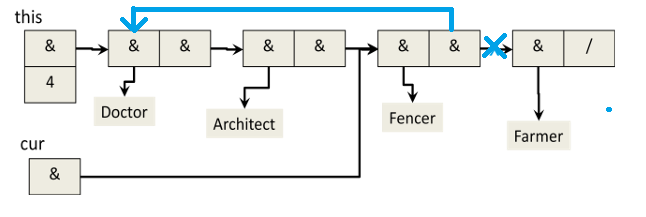
Show how the structure would look after the command
cur.next = first;
has been executed by putting X(s) thru old arrow(s) and adding new arrow(s).
I've replaced the original image with the modified one.
- If we have a Object variable
obj, and we want to check to see if it holds a Circle object, the way to do that is- if (Circle extends Object)
- if (Circle implements Object)
- if (Circle instanceof Object)
- if (obj extends Circle)
- if (obj instanceof Circle)
e
- What is the output of the following code,
assuming that
setColorandgetColordo as their names imply?Car myCar = new Car("Blue"); Car disCar = myCar; Car stevesCar = new Car("Green"); disCar.setColor("Red"); myCar.setColor("Yellow"); System.out.print(disCar.getColor());- Blue
- Green
- Red
- Yellow
- (it’s impossible to tell from the given information)
d
myCaranddisCarrefer to the same Car object. Its colour is blue at first, then red, and finally yellow.- The Comparable interface requires the ___ method to be defined:
- boolean compareTo(T one, int result)
- boolean compareTo(T one, T other)
- boolean compareTo(T other)
- int compareTo(T one, T other)
- int compareTo(T other)
e
- The command to create a new array of size N and type T (where T is the base type of a templated class) is:
- Object[] arr = (Object[])new T[N];
- Object[] arr = new T[N];
- T[] arr = (T[])new Object[N];
- T[] arr = new (T[])Object[N];
- T[] arr = new Object[N]; f) T[] arr = new T[N];
c
- Among the reasonable options for dealing with a possible operational failure in an ADT operation is NOT:
- have the method return a boolean value: true for success, false for failure.
- print an error message.
- return a special value (such as null or -1, if they are available).
- throw an exception.
- (all of the above are reasonable options for dealing with failure)
b
- Which of the following is NOT a problem that might arise when the add method is called on a Bag?
- the argument might already be in the bag.
- the argument might be null.
- the bag may be full.
- the bag might not have been properly initialized.
- (all of the above are possible problems for the add method)
a