CSCI 2341 Submission 01
Vigenere Encoding and Decoding a Single Character
|
Supplied files (copy from $sup01) |
DemoVigEncDec1.jar (the demo executable) VigEncDec1_shell.java (a starter shell for your source
code file) VigEncDec1.txt (the TextItems file of program description)
jar_b.sh (a script for building your executable jar file)
my_tests_partial.sh (a partial testing script)
|
|---|---|
| Files to submit |
VigEncDec1.jar (your executable jar file) VigEncDec1.java (your source code file) my_tests.sh (your completed testing script)
|
| Where to put them |
Copy them to your u##/submissions/s01
subdirectory.
|
| When they're due | Sunday, September 28, 2025 @11:59pm |
A summary of our Java coding style rules to which you should pay close attention is given here: Style Rules
The course policy on cheating is given here: Policy on Cheating
This first submission is the first part of what is essentially a two-part submission sequence designed to get you "up and running" and give you some practice in the very important practice of "iterative development". For this first part you will design and write a Java program that can encode or decode a single uppercase letter input from the command line using a Vigenere encoding/decoding scheme, and write the corresponding encoded or decoded uppercase letter out to the screen. Each run of the program performs either the encoding or the decoding of a single uppercase letter. There are also three kinds of errors that that program must recognize if they occur. In each case the program must display an appropriate message, followed by a pause, and then terminate.
When the program is run with no command-line input, it first displays an
opening screen containing programmer and program identification
information, and then a second screen of program information.
Each screen has a pause at the end, and the program terminates after the
second screen. The first screen must be produced with the
instructor-supplied OpeningScreen class, and the second with
the instructor-supplied TextItems class (in conjunction with
the supplied VigEncDec1.txt file).
The program, and all its resources, must be placed in, and must run
from, an executable jar file. Thus a first order of business, is
to make sure you know how to create an executable jar file and place within
that jar file all the necessary files for the program to run as a
stand-alone, single file. For this first submission you are given the file
jar_b.sh for building the required jar file. For subsequent
submissions you will want to create and use an appropriately modified copy
of this file.
To design the program you need to understand, of course, how the Vigenere encoding/decoding scheme works, and that is described next.
First, a little history: The Vigenere cipher, which is one example of a "polyalphabetic substitution cipher", has a rich history starting with its initial descriptions by Giovan Battista Bellaso in 1553 and Blaise de Vigenere in 1586. While credited to Vigenere, the cipher was also developed independently by Bellaso and is considered a hybrid of Bellaso's cipher, Trithemius' cipher, and Vigenere's autokey cipher. For centuries, it was believed to be unbreakable, earning it the description "the indecipherable cipher", but was eventually cracked by Charles Babbage and Friedrich Kasiski in the mid-19th century. And, of course, today there are more secure alternatives.
Essentially the Vigenere cipher is a method of encrypting alphabetic text where each letter of the plaintext is encoded with a different "Caesar cipher" (another, simpler, kind of encoding/decoding scheme actually used by Julius Caesar), whose increment is determined by the corresponding letter of another text, the key. There are many versions of the Vigenere cipher, but we will use perhaps the simplest one, which uses the following "Vigenere square":
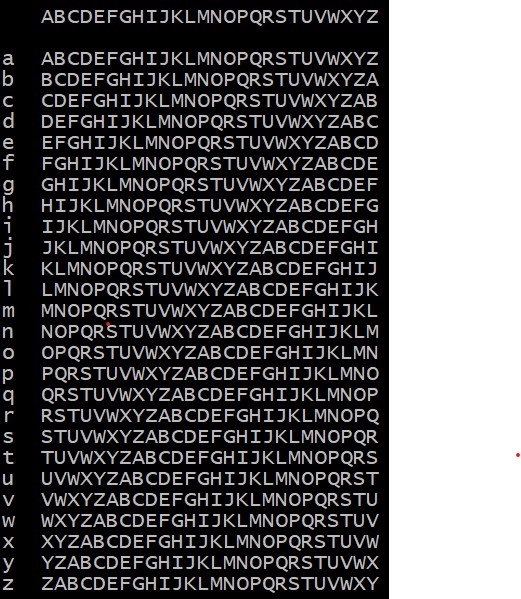
Once you have this square, the encoding or decoding of a single uppercase letter using a single lowercase letter as the key is quite straightforward. For example, suppose you want to encode the uppercase letter P using the lowercase letter f as the key. In this case P is encoded by the uppercase letter U, since U is in row f and column P. The encoding of any other uppercase letter using any other lowercase letter as the key would proceed analogously. Furthermore, the decoding process is simply the reverse of the encoding process.
We are using only uppercase and lowercase letters, but for reference you can find a complete ASCII table (which, of course, contains those characters) here.
VigEncDec1.jar executable jar file to
see what your program output should look like when you run it with
no command-line input, and pay particular attention to the second output
screen, which contains the program information. Note that this
information is available to you in the supplied TextItems
file VigEncDec1.txt, which your program must also display in
a similar manner.
VigEncDec1_shell.java) and be sure to follow the
appropriate rules and guidelines. Each of your methods should be
preceded by a short javadoc comment describing what the
method does, along with any other comments that might be required to
explain your code. Of course, your code should be so clear that such
comments should be minimal.
OpeningScreen for your opening screen
TextItems for your program information screen (this
class will use the VigEncDec1.txt file)
Utils for its pause() method
jar_b.sh script, which "knows" where the instructor-supplied
files listed above are located on the server.
VigEncDec1.java source code
file, your VigEncDec1.jar executable jar file, which
contains all of the necessary files for the complete program and which
can be run from the command line, and your my_tests.sh
testing script, to which you must have added some additional test runs.
VigEncDec1.jar file (which will be created when you run
the jar_b.sh script):
VigEncDec1.class (you produce this one)
VigEncDec1.txt (supplied with this assignment)
OpeningScreen.class (available on the server)
TextItems.class (available on the server)
Utils.class (available on the server)
my_tests.sh and the
partially complete version of this file supplied with the assignment,
which you must complete by adding additional tests. For subsequent
assignment submissions to your server account, you will have to create
your own testing script, but you can use this one as a model, by taking a
copy and making appropriate modifications for each new submission.
fjc command for help with formatting your source code):
VigEncDec1.jar file: To do this you first make a copy
of your jar file in a new directory that is otherwise empty, then you
open a command window on that directory and try to run your jar file at
the command prompt in that directory. If it does not run properly there,
you have done something wrong, and the marker will not be able to run
your jar file either. And by the way, if you have placed your source code
in a Java package, that is one reason that may cause your jar file to
fail the acid test!